✨ Features
🪟 Workspace & Terminal Management
| Feature |
Description |
| Project-Based Workspaces |
Organize terminals by project with dedicated workspace directories, separate state, and per-project configuration |
| Pane-Based Split Layout |
Split your workspace into resizable panes and arrange terminals, editors, and browser tabs side by side |
| Tabbed Interface |
Windows Terminal-style tab bar with drag-and-drop reordering, rename, and context menu |
| Multiple Shell Support |
Auto-detects PowerShell, CMD, Git Bash, WSL, fish, zsh, and more; switch shells per tab |
📝 Editor & File Management
| Feature |
Description |
| Code Editor |
Built-in code editor with syntax highlighting, file buffers, dirty-state tracking, and save/reload |
| Markdown Editor |
Rich markdown editing powered by BlockNote with live preview, table of contents, and heading navigation |
| Mermaid Diagrams |
Render Mermaid diagrams inline within your markdown documents |
| File Explorer |
Full file tree with create, rename, delete, clipboard operations, drag-and-drop, and context menus |
| File Watching |
Live file watching for real-time updates as files change on disk |
🌐 Browser & Annotation
| Feature |
Description |
| Embedded Browser Tabs |
Browse the web directly inside your workspace using child webview tabs — no app switching |
| Annotation Workflow |
Capture browser states, annotate with severity and intent labels, review, and export |
| Annotation Export |
Package annotations with metadata into structured export formats |
⚡ Power User Tools
| Feature |
Description |
| Command Palette |
Global command launcher (Ctrl+K / Ctrl+Shift+P) for project switching, workspace actions, and more |
| Command History |
Per-project and aggregate command history viewer with search |
| Keyboard Shortcuts |
Fully customizable shortcut bindings for every action |
| Git Integration |
Status bar shows current branch, working directory, git status, and exit code |
| Custom Title Bar |
Desktop-native title bar with window controls, sidebar toggles, and settings navigation |
🔧 System & Reliability
| Feature |
Description |
| Auto-Updater |
Built-in update infrastructure with signed artifacts — get notified and update without leaving the app |
| State Management |
Zustand-powered reactive stores for projects, terminals, workspace layout, editor buffers, browser sessions, and settings |
| Configurable Settings |
Terminal and UI preferences, color picker, theme customization, and shell configuration |
| Cross-Platform |
Works on Windows, macOS, and Linux with native platform packaging |
| Error Boundaries |
Graceful error handling with runtime error boundaries and user-friendly fallback UI |
🗺️ Feature Map — Component Overview
| Domain |
Key Components |
Zustand Store |
| Workspace |
WorkspaceLayout, PaneRenderer, PaneContent, WorkspaceTabBar |
workspace-store |
| Terminal |
ConnectedTerminal, XTerminal, TerminalSearchBar, ActivityIndicator |
terminal-store |
| Editor |
EditorPanel, CodeEditor, MarkdownEditor, EditorToolbar, MermaidBlock |
editor-store |
| Browser |
BrowserPanel, BrowserControls, AnnotationPanel, AnnotationExportModal |
browser-session-store, annotation-store |
| File Explorer |
FileExplorer, FileTreeNode, FileTreeContextMenu |
— |
| Snapshots |
CreateSnapshotModal, RestoreSnapshotModal, DeleteSnapshotModal |
snapshot-store |
| Projects |
ProjectSidebar, NewProjectModal |
project-store |
| Settings |
ShortcutRecorder, ColorPickerPopover, ContextBarSettingsPopover |
app-settings-store, context-bar-settings-store |
| Updates |
UpdateAvailableToast, UpdateReadyModal |
updater-store |
| Shared |
CommandPalette, ContextMenu, ConfirmDialog, ShellSelector, ErrorBoundary |
— |
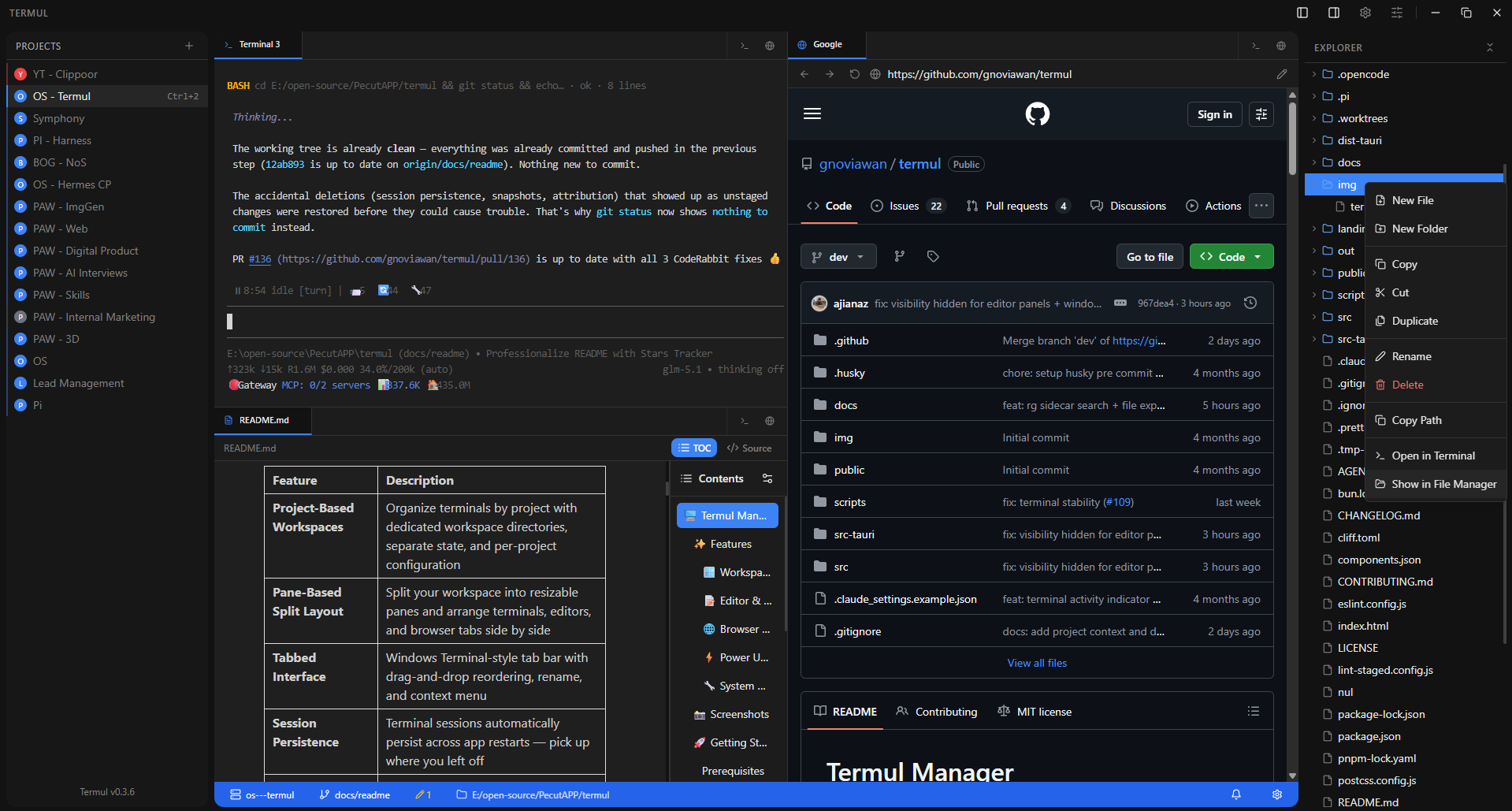
📸 Screenshots
📦 Install
Homebrew (macOS)
brew tap gnoviawan/termul
brew install --cask termul
curl (macOS/Linux)
curl -fsSL https://raw.githubusercontent.com/gnoviawan/termul/main/scripts/install.sh | bash
Windows users should install the .exe or .msi from GitHub Releases. Manual DMG downloads in a browser may still hit Gatekeeper, so macOS users should prefer Homebrew or curl.
🚀 Getting Started
Prerequisites
| Dependency |
Version |
Notes |
| Bun |
1.3+ |
JavaScript runtime and package manager |
| Rust |
Latest stable |
Required for Tauri builds |
Platform-Specific Requirements
Windows
- Microsoft Visual C++ Build Tools (included in Visual Studio 2022)
- WebView2 Runtime (pre-installed on Windows 10+)
macOS
xcode-select --install
Linux (Debian/Ubuntu)
sudo apt update
sudo apt install libwebkit2gtk-4.1-dev \
    build-essential curl wget file \
    libxdo-dev libssl-dev \
    libayatana-appindicator3-dev \
    librsvg2-dev patchelf
Linux (Fedora)
sudo dnf install webkit2gtk4.1-devel \
    gcc gcc-c++ libopenssl-devel \
    appindicator-devel librsvg2-devel \
    patchelf
Install Rust Toolchain
curl --proto '=https' --tlsv1.2 -sSf https://sh.rustup.rs | sh
rustc --version && cargo --version
Quick Start
# Clone the repository
git clone https://github.com/gnoviawan/termul.git
cd termul

# Install dependencies
bun install

# Launch in development mode
bun run dev
Landing Page
This repository also includes a standalone Vite landing page under landing/.
# Install landing page dependencies (from landing/)
cd landing && bun install

# Start the landing page dev server
bun run landing:dev

# Lint the landing page
bun run landing:lint

# Build the landing page for production
bun run landing:build
Building for Production
# Build for your current platform
bun run build

# Platform-specific builds
bun run build:tauri:win        # Windows (x64)
bun run build:tauri:mac-arm    # macOS (Apple Silicon)
bun run build:tauri:mac-x64    # macOS (Intel)
bun run build:tauri:linux      # Linux (x64)

# Debug build (faster compilation, larger binary)
bun run build:tauri:debug
Build output: src-tauri/target/release/bundle/
📖 Documentation
Usage
Creating a Project
- Click the + button in the sidebar to create a new project
- Select a workspace directory
- Configure your default shell (optional)
Terminal Tabs
| Action |
How |
| New terminal |
Click + next to tabs |
| Select specific shell |
Click the dropdown arrow |
| Reorder tabs |
Drag and drop |
| Rename tab |
Double-click the tab |
| Context menu |
Right-click (rename, close, kill process) |
Keyboard Shortcuts
| Action |
Default Shortcut |
| New Terminal |
Ctrl+T |
| Next Tab |
Ctrl+PageDown |
| Previous Tab |
Ctrl+PageUp |
| Command Palette |
Ctrl+K / Ctrl+Shift+P |
Shortcuts are customizable in Settings. On Tauri/WebView2, browser-reserved shortcuts such as Ctrl+Tab are not used as defaults because they are not reliably interceptable.
Architecture
Tech Stack
Tauri Plugins
| Plugin |
Purpose |
@tauri-apps/plugin-fs |
Filesystem access |
@tauri-apps/plugin-store |
Configuration persistence |
@tauri-apps/plugin-os |
OS information |
@tauri-apps/plugin-dialog |
Native dialogs |
@tauri-apps/plugin-clipboard-manager |
Clipboard operations |
@tauri-apps/plugin-updater |
Automatic updates |
@tauri-apps/plugin-process |
Process management |
Project Structure
src/
├── renderer/           # React frontend
│   ├── components/     # UI components
│   ├── hooks/          # Custom React hooks
│   ├── lib/            # Runtime adapters & desktop integration
│   ├── pages/          # Page components
│   └── stores/         # Zustand stores
├── shared/             # Shared types (main/renderer)
src-tauri/              # Rust backend, config & bundling
docs/electron-old/      # Archived Electron docs & migration history
Platform Adapters
The renderer uses an adapter/service layer to keep desktop integrations isolated from UI code:
src/renderer/lib/
├── tauri-*.ts        # Tauri-native integrations
├── *.ts              # Runtime-safe facades & helpers
└── __tests__/        # Regression & parity coverage
🛠️ Development
bun run dev              # Development mode with hot reload
bun run test             # Run tests
bun run test:watch       # Tests in watch mode
bun run typecheck        # Type checking
bun run lint             # Linting
bun run tauri <command>  # Direct Tauri CLI access
SSH Development Notes
- SSH passwords and key passphrases are stored through the OS keychain, not in
ssh-profiles.json.
- Active SSH sessions may retain the relevant secret in process memory only to support automatic reconnect; use SSH agent authentication to avoid runtime secret retention.
- Interactive SSH terminals use OpenSSH's default known-hosts file with
StrictHostKeyChecking=accept-new; do not override UserKnownHostsFile to /dev/null/NUL because that disables persistent host-key verification.
- Local port forwarding uses
ssh2 channel_direct_tcpip over the active SSH session; remote/reverse forwarding is not supported by the MVP command path yet.
ssh2 intentionally stays on system OpenSSL for now. Enabling vendored-openssl forces a local OpenSSL source build that can fail in Windows/MSYS environments without a complete Perl module setup.
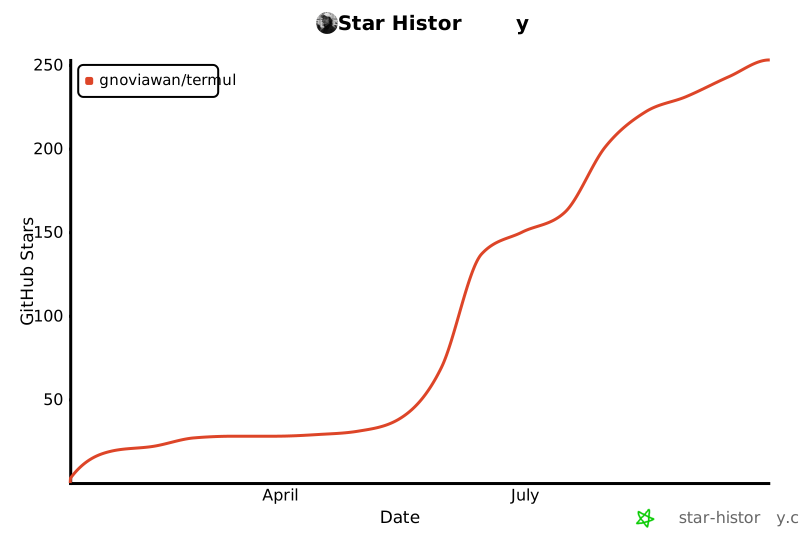
⭐ Star History
🤝 Contributing
Contributions are welcome! Please read the Contributing Guide for details on our code of conduct and the process for submitting pull requests.
📄 License
This project is licensed under the MIT License — see the LICENSE file for details.
🙏 Acknowledgments





