
TypeScript
control-room
terminals vps for vibe coders, tmux alternative
★ 17⑂ 324 Jun 2026
terminals vps for vibe coders, tmux alternative




A mobile-first PWA dashboard for driving a single VPS through a web browser: multi-pane terminals (up to 16 concurrent ptys), AI agent launchers, host ops, and audit — all behind a single shared secret and a Tailscale-only domain.
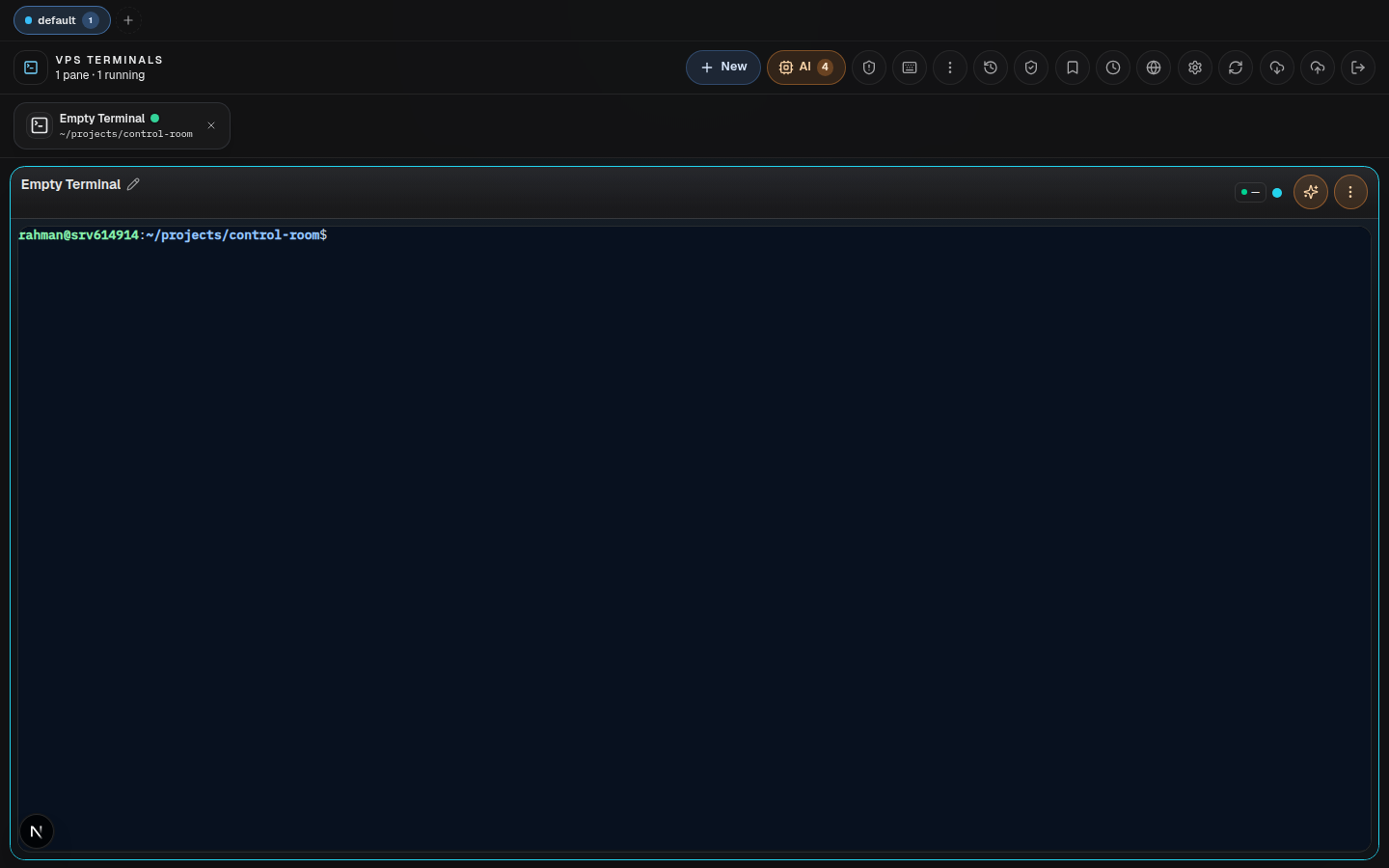
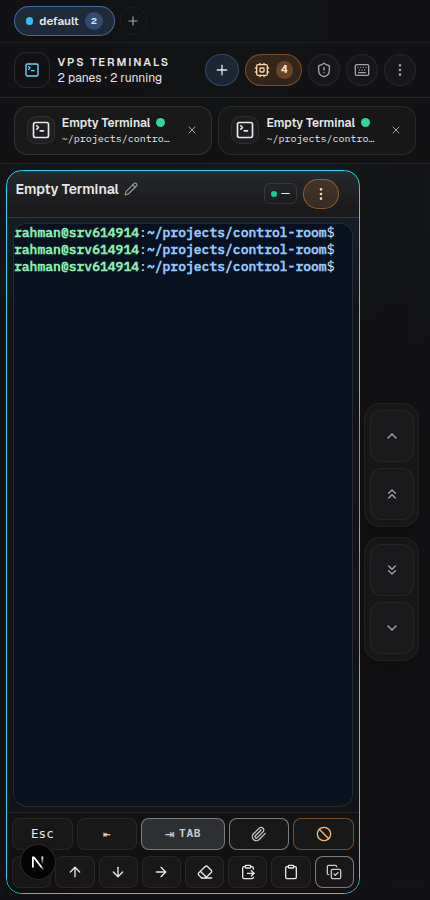
Real authenticated captures of the running app, taken from a local next dev render with a local agent gateway and real terminal panes.
What's new in v2.0: single-kebab pane header, per-terminal skills (project + global), Move-to-workspace, 4-step zoom, heartbeat outer-glow with a Test-heartbeat button, cross-browser workspace sync via agent-side JSON, exact 2-row desktop grid, two-row mobile soft keyboard with prominent Tab, plus local laptop install via
vps-cr.
| Terminals | AI agents | Host ops | Mobile |
|---|---|---|---|
| 16 ptys, reconnect buffers, broadcast input | Claude / Codex / Gemini / OpenClaw launchers with regular or bypass modes | Agent-owned systemd, Docker, journal, telemetry and file APIs | PWA layout, soft keyboard with Tab, one-column portrait mode |
This is intentionally not a public SaaS or remote-desktop replacement. It is a single-owner control surface: the browser sees a safe web UI, while the local agent owns host access behind an authenticated, loopback-bound gateway.
┌─ frontend/  Next.js 15 App Router + Tailwind + shadcn/ui (Termux-style)
├─ agent/     Node 22 host agent — pty gateway, host telemetry, log.json
└─ scripts/   deploy.sh + bump-version.sh + systemd installer
Build id: every deploy stamps a 12-char commit prefix into
GET /api/version,NEXT_PUBLIC_BUILD_ID, and the service-worker cache name.scripts/deploy.sh mainrebuilds, restarts systemd, and refreshes Traefik. Auto-deploy via GitHub Actions is intentionally disabled (the workflow isworkflow_dispatch:only) — day-to-day deploys happen on the host.
| Path | Command | Time | Best for |
|---|---|---|---|
| 🤖 AI-assisted | npx rahman-cr ai claude |
~20 min | Paste prompt into Claude / Codex / Gemini, get walked through every step |
| ⚡ One-line | npx rahman-cr install --vps user@ip --domain X |
~10 min | Already have SSH + Tailscale key + domain ready |
| 🛠️ Manual | follow docs/ONBOARDING.md | ~30 min | Want to read each step before running it |
| 💻 Local (this PC) | one line — see docs/INSTALL-LOCAL.md | ~5 min | Run the whole thing on your laptop — no VPS, SSH, or domain |
Step-by-step roadmap (VPS prep → SSH → Tailscale → DNS → install → verify): docs/INSTALL.md
Just want it on your own computer? One command on Windows / macOS / Linux — docs/INSTALL-LOCAL.md. Want an AI to set it up for you from zero? docs/AI-ONBOARDING.md.
| If you want to… | Read |
|---|---|
| Install on your VPS | docs/INSTALL.md — full roadmap with three paths |
| Just understand the steps | docs/ONBOARDING.md — five-phase walkthrough |
| Fix a bug / send a PR | CONTRIBUTING.md — local dev in 5 min, no VPS needed |
| Report a vulnerability | SECURITY.md — GitHub Security Advisory, not public issues |
| Run a local dev server (any OS) | docs/INSTALL.md → Phase L — Linux / macOS / Windows, no VPS. Note: next dev reads env from frontend/.env.local, not just the root copy. |
Three tiers, one direction-of-trust:
browser ──► frontend (Next.js)            ─┐
                ▼                          │ HMAC-signed cookie auth
                HTTP / WS (control-room   ─┘ over Tailscale
                secret)
                ▼
            agent (Node 22) ──► host kernel, Docker socket, systemd,
                                fail2ban, journalctl, file system
                ▼
            agent/var/*.json  (workspace state, future log.json)
Rules of trust
x-control-room-secret header), added by the Next.js proxy routes.127.0.0.1) by default (AGENT_HEALTH_HOST), so
the privileged host API is never network-exposed.CONTROL_ROOM_SESSION_SECRET, gated by
CONTROL_ROOM_SECRET at login.MAX_TERMINAL_SESSIONS in
agent/src/terminal/manager.ts). Opening a 17th evicts the
least-recently-updated session (LRU) rather than erroring. Each session keeps a
ring buffer of up to 250k chars and survives short reconnects.connecting / open / closed).shell, plus AI agent launchers (claude, codex,
gemini, openclaw). Built-in profiles live in
agent/src/terminal/profiles.ts; agent metadata in packages/runtime-config/.idle → working → planning → asking → done from output patterns. Drives the heartbeat glow.agent/var/workspaces.json via
GET/PUT /state/workspaces. The frontend hydrates from localStorage
first (instant render), then overwrites with the agent's authoritative
copy. Edits are debounced 600 ms and pushed back. Last-write-wins; no
realtime push.The pane header is one row: [title chip] [activity chip] [⋮ kebab]. The
kebab opens a tabbed modal:
Regular
and Bypass (--dangerously-skip-permissions / --yolo) launches.~/.agents/skills, ~/.claude/skills) plus
project skills resolved by walking up from the pane's cwd until a
marker (.git, package.json, deno.json, pyproject.toml,
Cargo.toml, go.mod) is found. Project hits are shown first.⏬ jump to MIN, −,
+, ⏫ jump to MAX).Auto or
fixed 1–4 per row.(100dvh − var(--terminal-tops-h)) / 2 tall, so two rows fit on screen and a third row starts the scroll
instead of squashing every pane.Mobile shows a per-pane two-row soft keyboard above the OS keyboard:
Esc, Shift+Tab, Tab (wider), Ctrl+C.← ↑ ↓ →, plus optional Clear, Paste, Copy,
Select all (each toggleable in settings).Desktop hides the soft keyboard entirely — the physical keyboard already covers it, and hiding lets the terminal fill the full pane height.
working, planning, or asking. Toggle in Settings.
Honors prefers-reduced-motion.data-heartbeat-test='on' on <html>.The glow only fires on AI agent sessions (Claude / Codex / Gemini), because activity detection is heuristic on agent output. Plain shell sessions stay still.
Pane action → Browse folders opens a dialog backed by GET /fs/list?path=…
on the agent. Lets you cd into a directory directly from the modal.
agent/src/cron/ hosts a small cron runner with an HTTP API. Frontend has
a "Cron jobs" drawer to inspect schedules, recent runs, and trigger ad-hoc
executions. Each cron action is validated (type + length bounds) before it runs.
Save current pane configuration (profile, cwd, model, agent flags) as a
named template; relaunch with one click. Persisted to localStorage
(can be promoted to agent-side JSON the same way workspaces were).
CONTROL_ROOM_SECRET gates /api/auth/login;
on success a cookie signed with CONTROL_ROOM_SESSION_SECRET (different
value) is set for SESSION_EXPIRY_HOURS (default 72 — 3 days; middleware
slides it forward on activity, so an active dashboard never logs out)./fs/list, /skills,
/state/*, terminal gateway), passed via x-control-room-secret header
by the Next.js proxy routes.vps-control-room-v<commit12>).<head> early-asset error trap,
forceFreshReload() (SW unregister + cache purge + _v= bust),
VersionGuard polling /api/version every 5 min and on
visibility/focus, plus extension-noise suppression.data-os skins; Windows run paths in
docs/NATIVE-WINDOWS.md.Workspace state is shared via agent/var/workspaces.json, so opening the
panel in a new browser tab/device shows the same workspaces, the same
session→workspace map, and the same active workspace. Live pty output
itself is on the agent, so multiple browsers connecting to the same
session id stream the same buffer.
sudo apt-get install -y nodejs npm   # or via nvm — Node 22+
sudo usermod -aG docker $USER         # if you want docker collector
git clone git@github.com:<you>/control-room.git
cd control-room
cp .env.example .env.local
$EDITOR .env.local                    # fill CONTROL_ROOM_SECRET et al.

npm --prefix frontend install
npm --prefix agent install
sudo bash scripts/install-systemd.sh
sudo systemctl enable --now vps-control-room-agent vps-control-room-frontend
This installs unit files with WorkingDirectory pointing at the repo path
the script was invoked from, and EnvironmentFile pointing at
<repo>/.env.local.
A dynamic-config template lives at ops/traefik/vps-control-room.yml. The
deploy script envsubst's it and syncs to /etc/dokploy/traefik/dynamic/
on each run. Bind your Tailscale-only domain there.
bash scripts/deploy.sh main
What it does (in order):
/tmp/vps-control-room-deploy.lock (flock).require_file .env.local, ops/traefik/vps-control-room.yml. Loads env.git fetch origin → git checkout <branch> → restore the deploy-stamped
sw.js → git pull --ff-only origin <branch> (fast-forward only; aborts on
divergence rather than discarding local work).npm run test (frontend unit tests). Skip with
SKIP_FRONTEND_TESTS=1.scripts/bump-version.sh <commit12> — stamps sw.js,
NEXT_PUBLIC_BUILD_ID, and /api/version.npm run build) into .next-staging.npm run build) only if any source under agent/ changed
since the last deploy stamp..next-staging → .next by restarting the frontend
against the staged build; keeps .next-previous for one-shot rollback if
the new build fails to come up, plus recent static snapshots under
.deploy-state/./etc/dokploy/traefik/dynamic/.systemctl is-active for both services..github/workflows/deploy.yml is workflow_dispatch: only. Push does not
auto-trigger. To trigger remotely: GitHub → Actions → "Deploy VPS Control
Room" → Run workflow. The workflow stages env from
$HOME/.config/control-room/.env.local on the self-hosted runner before
delegating to scripts/deploy.sh.
Environment variables (all optional except auth secrets):
| Variable | Default | Purpose |
|---|---|---|
CONTROL_ROOM_SECRET |
(none) | Required at login + gateway header. |
CONTROL_ROOM_SESSION_SECRET |
(none) | HMAC key for session cookies. |
AGENT_GATEWAY_SECRET |
falls back to CONTROL_ROOM_SECRET |
Dedicated frontend→agent machine secret. |
SESSION_EXPIRY_HOURS |
72 |
Cookie lifetime (3 days; slides forward on activity). |
CONTROL_ROOM_PORT |
4000 |
Frontend listen port. |
AGENT_HEALTH_PORT |
4001 |
Agent HTTP + WS listen port. |
AGENT_HEALTH_HOST |
127.0.0.1 |
Agent bind interface (loopback by default). |
TERMINAL_GATEWAY_URL |
http://127.0.0.1:4001 |
Frontend → agent base URL. |
DOCKER_SOCKET_PATH |
/var/run/docker.sock |
Docker socket (optional). |
STATE_DIR |
<agent cwd>/var |
Where /state/* + log.json live. |
HOST_TELEMETRY_INTERVAL_MS |
15000 |
Agent telemetry sample period. |
Frontend client-side env (must be NEXT_PUBLIC_* and is therefore baked
into the bundle):
NEXT_PUBLIC_APP_URL, NEXT_PUBLIC_APP_HOSTNEXT_PUBLIC_BUILD_ID (auto-stamped by deploy)frontend/src/features/terminals/lib/utils.ts,
SOFT_KEYBOARD_KEYS. Toggle per-key visibility in Settings.packages/runtime-config/index.js lists each agent
(id, launchCommand, terminalProfile, model).frontend/src/features/terminals/lib/utils.ts
(detectIdleActivity) classifies recent output. Tweak there if your
agent's "asking for confirmation" prompt doesn't match.--terminal-tops-h in
frontend/app/styles/terminals/pane-stack.css if you add or remove a top bar.frontend/app/styles/terminals/heartbeat.css, the
pane-heartbeat-glow keyframes.At 16 live sessions (MAX_TERMINAL_SESSIONS in
agent/src/terminal/manager.ts) the agent evicts the least-recently-updated
session to make room — it doesn't show an error. Close panes you don't need, or
bump the constant and redeploy for a higher cap.
systemctl status vps-control-room-agent — agent process up?journalctl -u vps-control-room-agent -n 100 — pty failures?curl -sf http://127.0.0.1:4001/health -H "x-control-room-secret: $SECRET"TERMINAL_GATEWAY_URL points at the agent's actual port.claude/codex/gemini/...),
not for plain shell panes — activity detection is keyed to agent
output patterns. Run "Test heartbeat" to preview the animation.GET /api/version
reports a different build id. Ctrl-Shift-R forces an immediate refresh.frontend/public/sw.js first two lines — they should show the
current commit prefix. If not, bash scripts/bump-version.sh $(git rev-parse HEAD | cut -c1-12)
manually and redeploy.agent/var/workspaces.json is last-write-wins. If two
browsers were both editing, the most recent PUT wins. The other browser
catches up on next page load (no realtime push)..
├── agent/
│ ├── src/
│ │ ├── app/ # bootstrap + health-server (HTTP + WS)
│ │ ├── collectors/ # system telemetry (CPU/RAM/disk/net)
│ │ ├── cron/ # scheduler + HTTP triggers
│ │ ├── fs/ # explorer + skill listing
│ │ ├── state/ # JSON state store + log.json
│ │ └── terminal/ # pty manager + ws/http gateways
│ └── dist/
├── frontend/
│ ├── app/ # Next.js App Router (login, view, api/*)
│ │ ├── api/auth/ # HMAC login + logout
│ │ ├── api/terminals/ # pty session/input/resize/stream
│ │ ├── api/state/[key]/ # agent JSON state proxy
│ │ ├── api/log/ # agent log.json proxy
│ │ ├── api/skills/ # global + project skills (cwd-aware)
│ │ └── styles/ # base, drawers, keyboard, terminals…
│ └── src/features/terminals/ # the entire terminal workspace
│ ├── components/ # pane, kebab menu, soft keyboard …
│ ├── hooks/ # sessions, workspaces, settings …
│ └── server/ # gateway helpers (agent fetcher)
├── ops/traefik/ # dynamic-config template
├── packages/
│ ├── contracts/ # shared TS types
│ └── runtime-config/ # environments + agent profiles
├── scripts/
│ ├── deploy.sh # canonical deploy (run on host)
│ ├── install-systemd.sh # one-shot systemd setup
│ ├── bump-version.sh # build-id stamper
│ └── cleanup-terminal-runtime.sh
├── docs/ # install, onboarding, runbook, AUDIT-2026-06,
│ # PROGRESS-2026-06, NATIVE-WINDOWS
├── .env.example
├── PRD.md # full product spec
└── README.md # this file
MIT — use it, fork it, ship it. See CONTRIBUTING.md for the PR flow and SECURITY.md for the threat model.
