TypeScriptRilis v0.1.0
framepilot
Browser-based 3D camera previsualization and shot planner for designing scenes, frames, camera angles, lenses, movements, and AI-ready prompts.
Browser-based 3D camera previsualization and shot planner for designing scenes, frames, camera angles, lenses, movements, and AI-ready prompts.
Browser-based 3D camera previsualization and shot planner for designing scenes, frames, camera angles, lenses, movements, and AI-ready prompts.
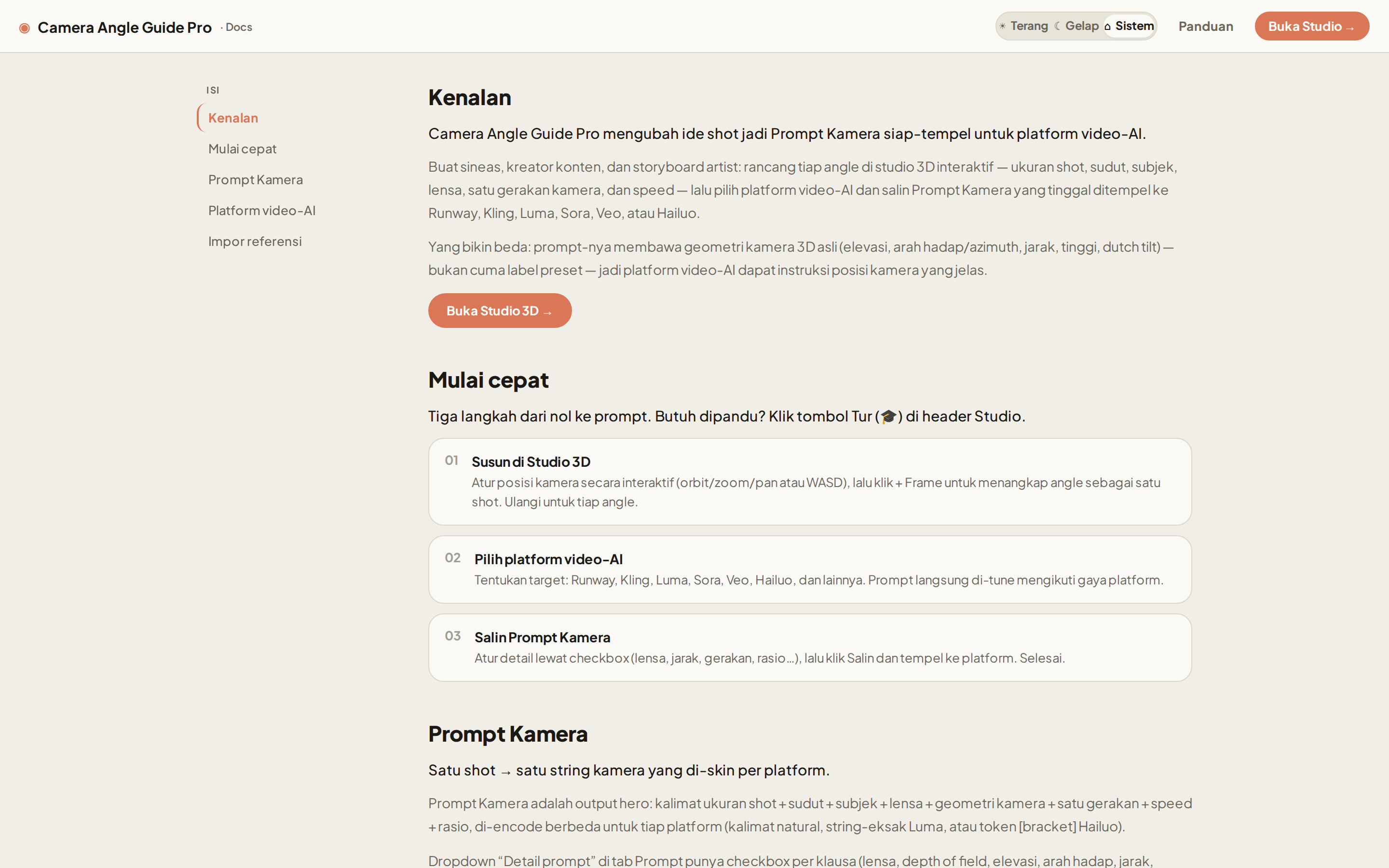
Plan camera shots in an interactive 3D studio, then export platform-tuned prompts for AI video models.
Camera Angle Guide Pro (package camera-angle-guide-data-prompt) turns the vague job of "describe the shot you want" into a concrete, repeatable workflow. You block out a shot in a real 3D viewport — orbit the camera, set the lens, place the subject — and the app reads that camera geometry back out as a paste-ready prompt, re-skinned for whichever AI video platform you target.
Because the shot is real 3D data (azimuth, elevation, distance, roll, FOV, subject transform), the same intent can be re-encoded for 10 different platforms without you rewriting a word — and a real camera-body look tag can ride along. Anonymous use runs entirely on localStorage; sign in and your projects sync to Convex Cloud.
The UI is in Bahasa Indonesia.
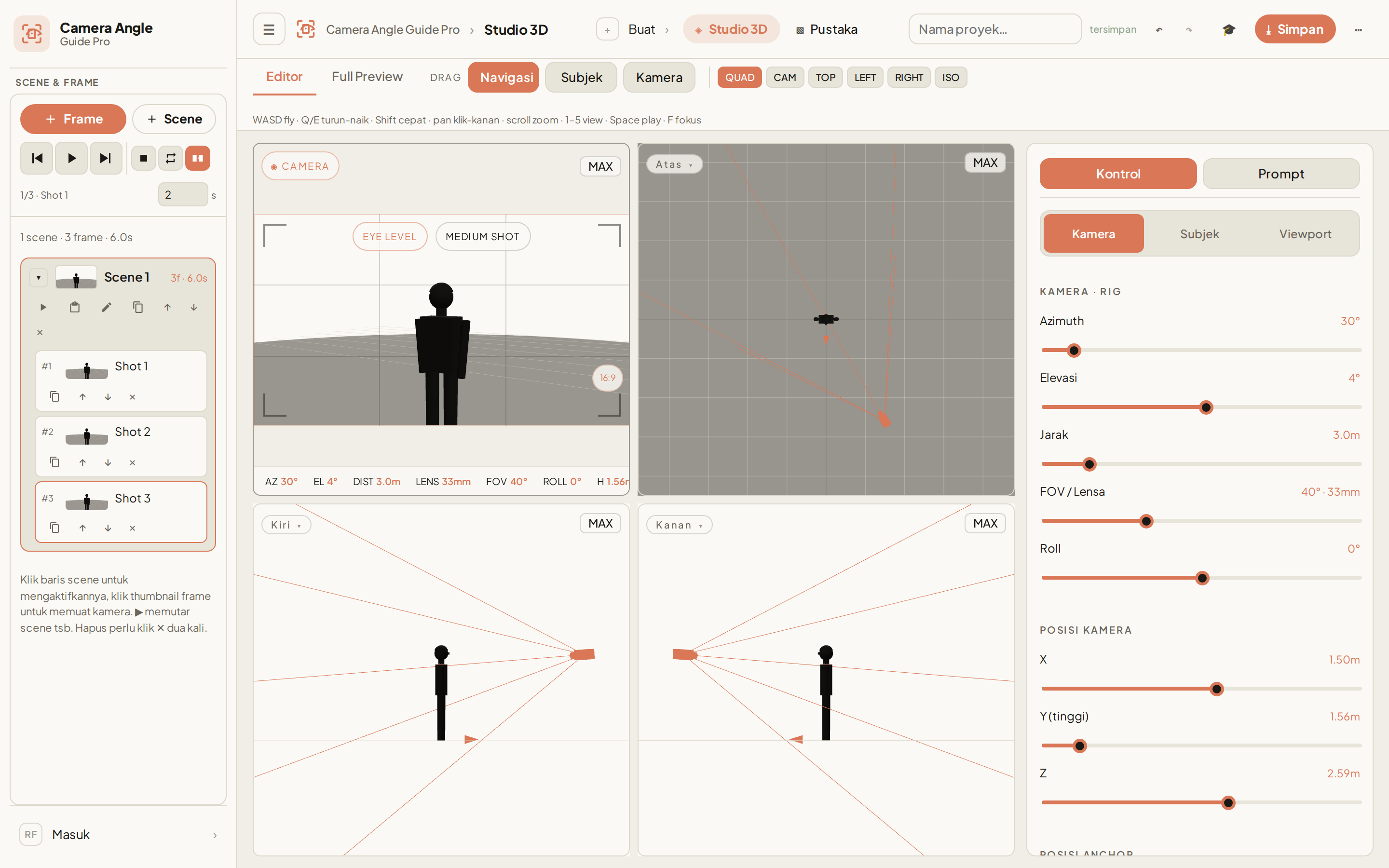
3D shot planner (/) — one persistent WebGL canvas rendering a scissor multi-viewport quad (cam / top / left / right), or a single focused view, or a full-bleed preview. WASD fly-nav, drag modes for Navigation / Subject / Camera, and rig sliders for azimuth, elevation, distance, FOV/lens, roll, plus raw camera and anchor positions.
Live Prompt Kamera — the Prompt tab shows the paste-ready prompt for the current selection (active frame → single shot; otherwise the whole project), with a 10-platform picker, a Copy button, per-platform hints, and a collapsible bilingual production detail dump.
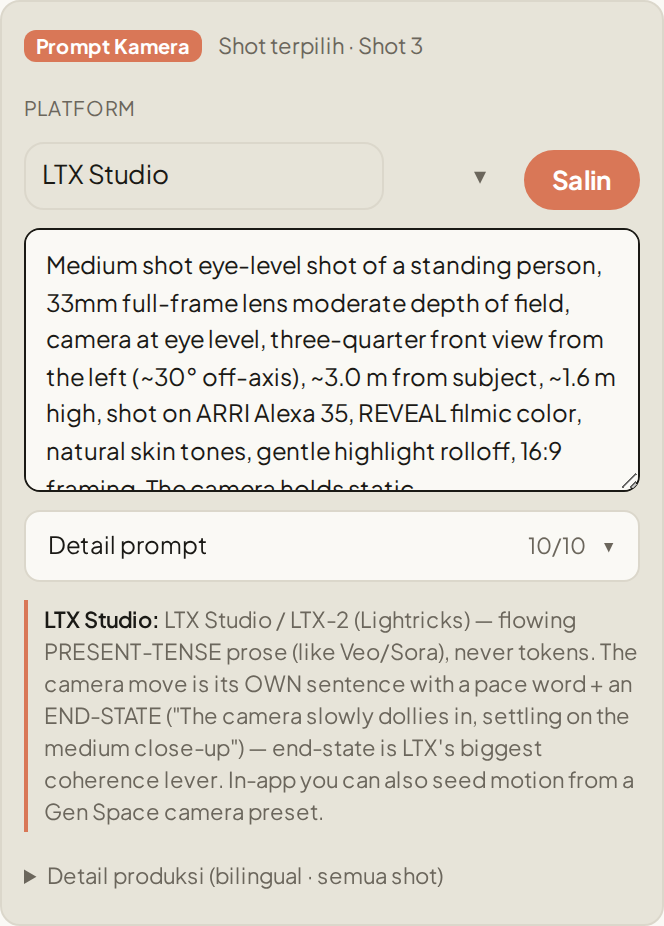
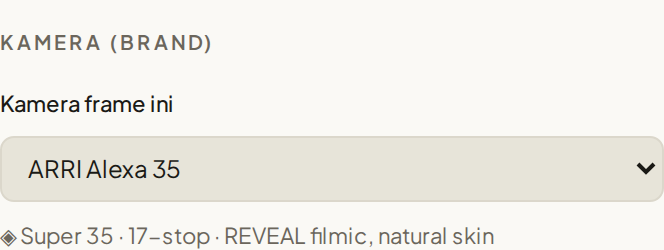
Camera brands — pick a real camera body (ARRI Alexa 35, ARRI Alexa Mini LF, RED V-Raptor, Sony Venice 2, Blackmagic, Canon C300, DJI Ronin/Mavic drone, iPhone 15 Pro, GoPro) and its signature look folds into the prompt (shot on ARRI Alexa 35, REVEAL filmic color, natural skin tones, gentle highlight rolloff). Each frame can use a different camera, or flip a global toggle to set one camera once for the whole project. Look descriptors are web-researched per brand; engineering specs stay in the UI, out of the prompt.
10 prompt-detail toggles — checkboxes for lens, depth-of-field, elevation, view, distance, height, dutch tilt, movement, framing, and camera-brand. Each folds one clause into the prompt live; the state is persisted per browser and shared by the Prompt dock and the Full Preview panel.
Scene / frame manager — add frames from the current camera, update dirty frames, per-frame duration, and a transport row (prev / play-pause / next / stop / loop / smooth transition) with playback indicator, portaled into the Studio sidebar.
Pustaka library (/library) — saved projects over the SSOT store with Grid / Table / Split views, alongside ✦ Preset starter cards ("Gunakan Template" builds a project from a preset and opens Studio 3D). Import camera-angle-guide/v2 JSON (paste, upload, or via an AI extraction-prompt helper for Photo / YouTube / File / Text sources). Presets and saved projects share this one library screen — /template now redirects here, so there is a single library destination.
Export — Project JSON, Shot List CSV, Prompt TXT (skinned at the selected platform), and Storyboard PNG.
Onboarding tour — a dependency-free 9-step coach-mark walkthrough that auto-runs once per browser on desktop, replayable from the header.
Standalone docs (/docs) and an in-app guide (/panduan).
Auth + cloud sync — Convex Cloud with @convex-dev/auth (Password). Signed-in users get per-user cloud projects; anonymous users stay fully local. An admin panel (/admin) is gated by a server-side email allowlist.
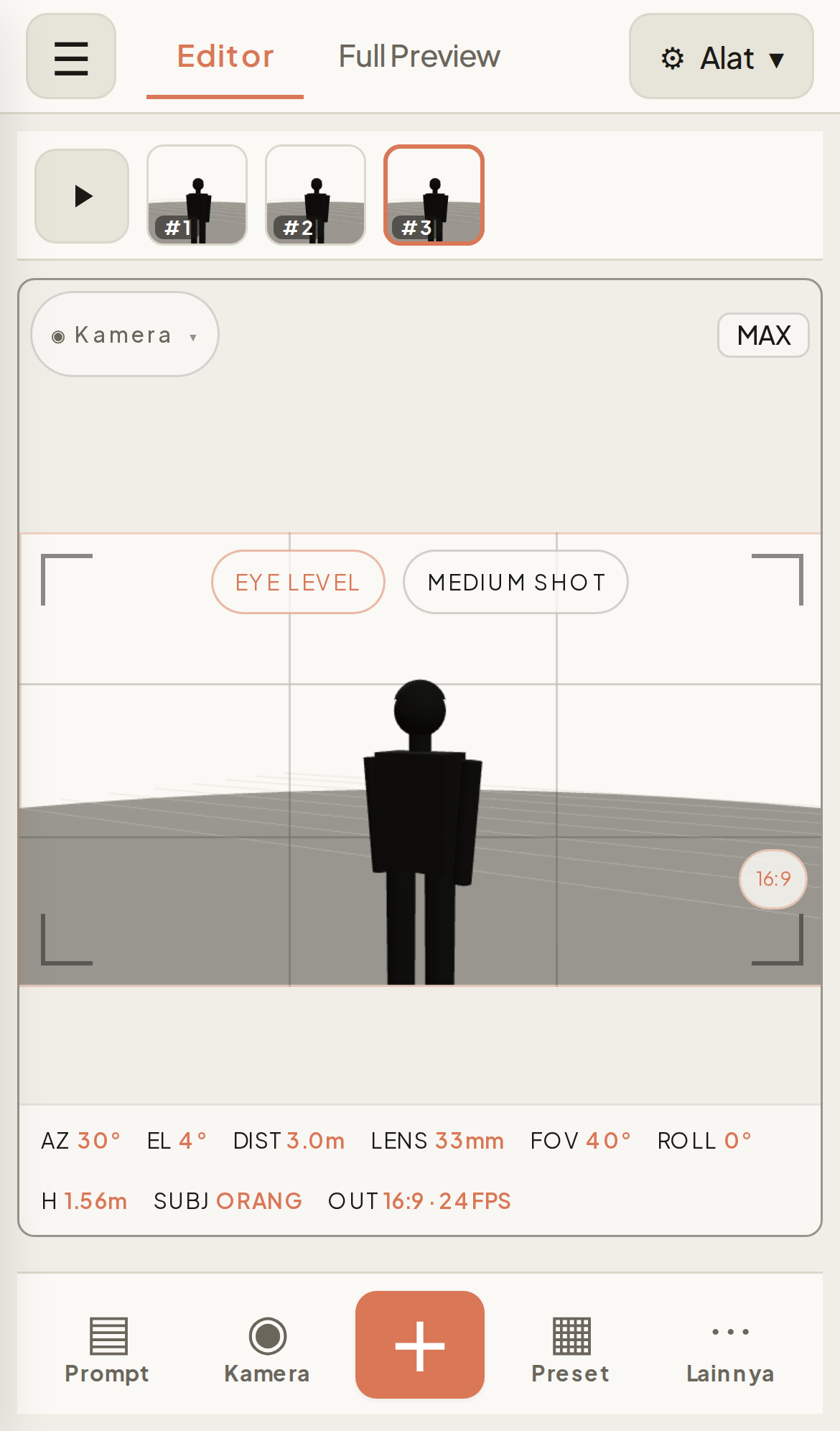
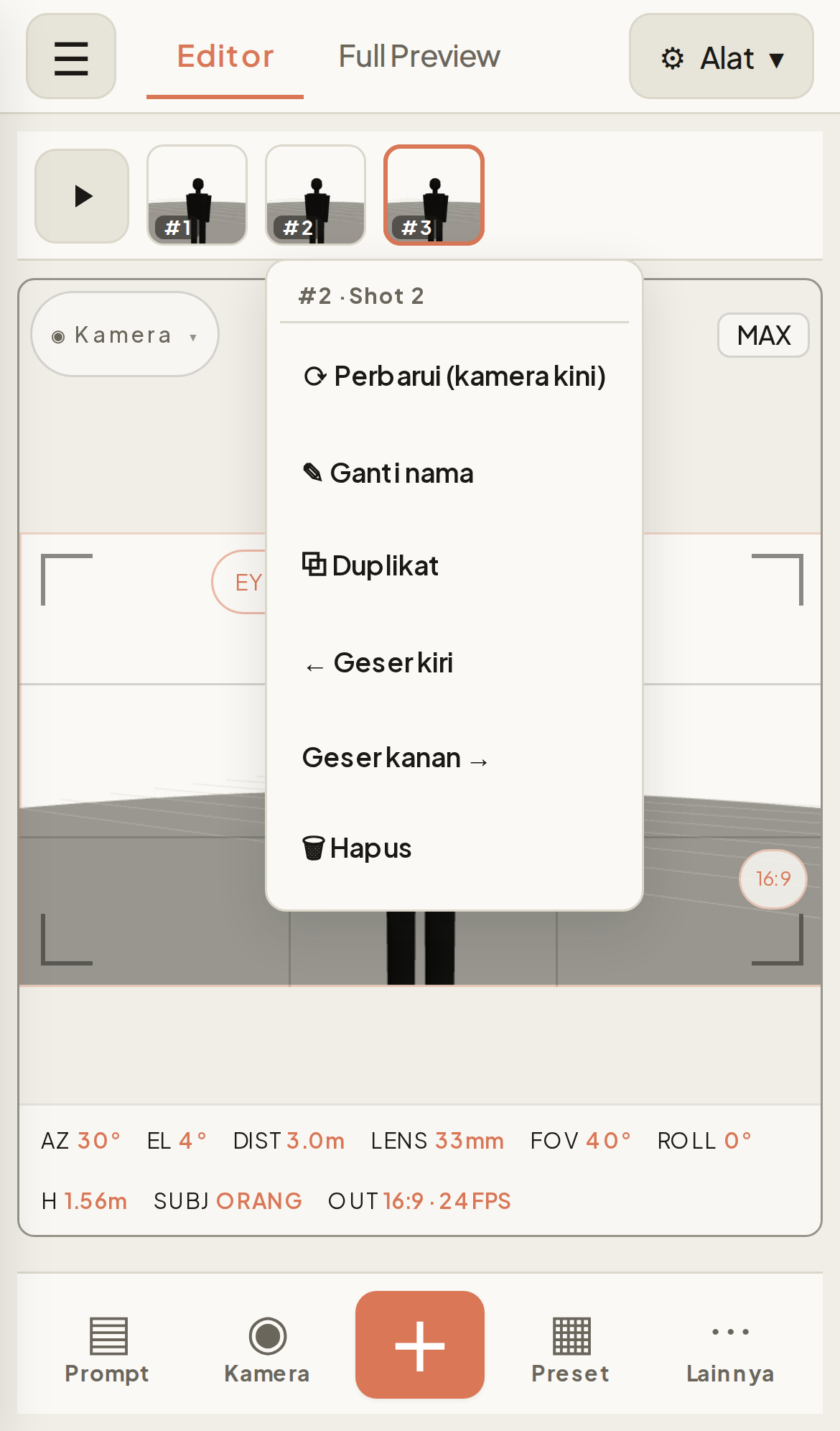
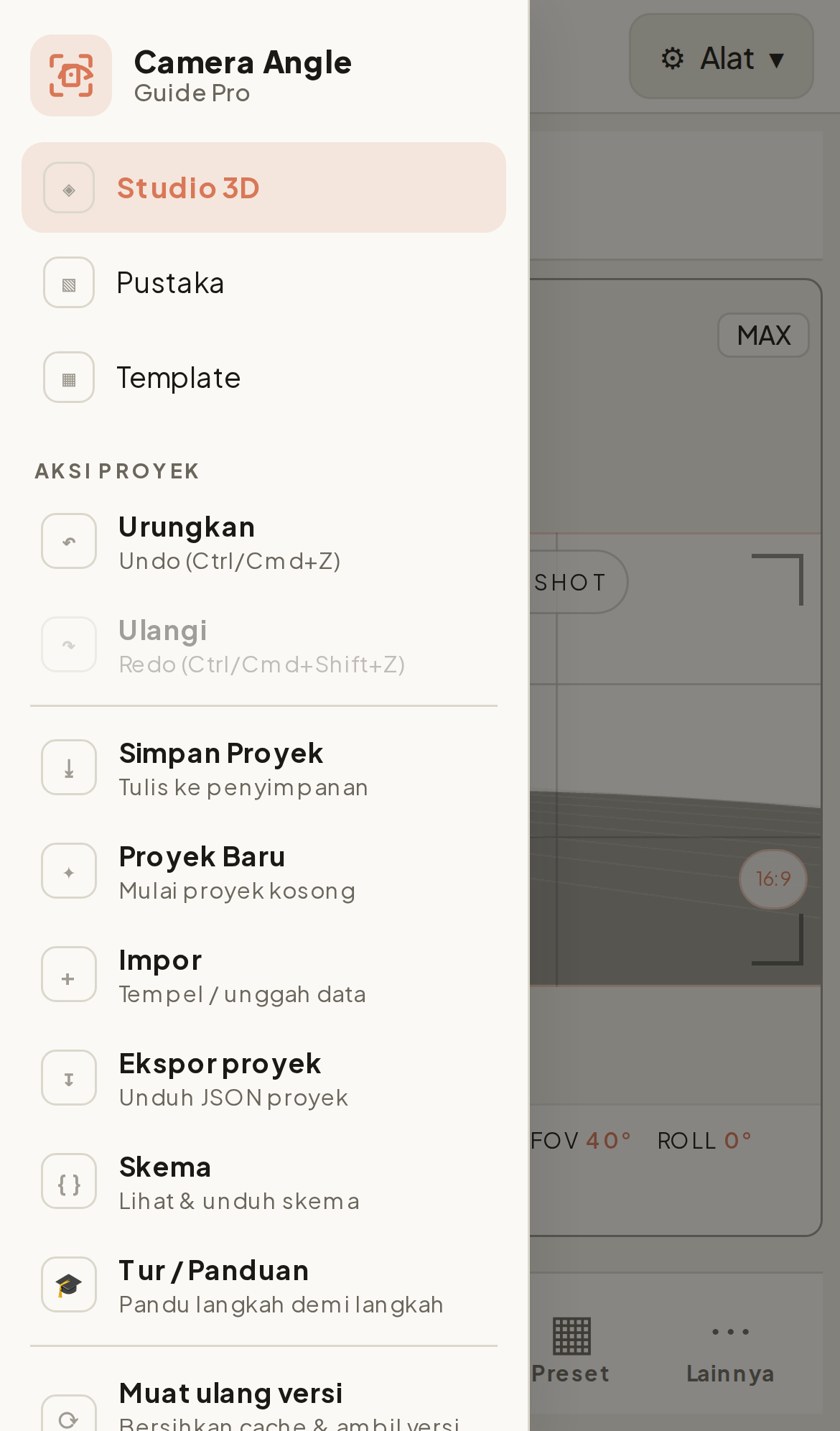
Mobile editor — a purpose-built ≤820px layout where the tabbar is the top bar (☰ · Editor · Full Preview · ⚙ Alat — no separate app header), a square-thumbnail frame strip, a big 3D canvas, and a bottom dock (Prompt · Kamera · + · Preset · Lainnya) that opens each controller section as an in-flow split panel. Two-finger pinch-zoom + pan; a long-press on any frame thumbnail — or any scene tile — opens a rename / duplicate / move / delete menu; and the ☰ drawer holds the app nav plus every project action (undo/redo, save, import/export, schema, tour, reload) that lives in the desktop ⋯ menu.
Installable PWA — a web-manifest + a conservative service worker (network-first navigations, cache-first static, Convex left untouched) make it installable to the home screen with an offline shell. A "Muat ulang versi" action force-purges the cache after a deploy.
Auth + cloud sync — Convex Cloud with @convex-dev/auth (Password). Signed-in users get per-user cloud projects; anonymous users stay fully local. An admin panel (/admin) is gated by a server-side email allowlist.
/template redirects to /library (one library destination, no Pustaka-vs-Template split).flowchart TD
A[Idea or Import JSON] --> B[AppState library - SSOT store]
B -->|localStorage or Convex sync| C[Studio 3D rig - EditorState]
C --> D[EditorViewport - one persistent WebGL canvas]
D -->|drag orbit lens subject| E[EditorFrame + shot meta]
E --> F[toNeutral]
B -->|RawFrame library shape| F
F --> G[NeutralShot - 3D geometry + one move]
H[Platform pick - 10 targets] --> I[encodeShot]
N[Camera brand pick] --> I
J[ShotOptions - 10 toggles] --> I
G --> I
I --> K[Per-platform skin - sentence luma bracket]
K --> L[Copy paste-ready prompt]
K --> M[Export project JSON]
Two React contexts drive the app: AppState (useApp) is the /library SSOT — Convex when signed in, localStorage when anonymous — and EditorState (useEditor) owns the v2 EditorProject, a mutable rig ref, and history/playback. The 3D engine is injected imperatively via registerEngine(handle), so rig changes mutate in place with no React re-render per tick.
The EditorViewportEngine is a single plain-TS class over Three.js: one WebGLRenderer with setScissorTest(true), mounted once and kept alive for the lifetime of the screen. Switching tabs never disposes it — the canvas DOM node is reparented and setActiveTab gates which scissor rects draw.
The prompt engine (src/lib/prompt/*) is pure functions — no React, no Three imports — so the same wording has a single source of truth. It runs in three stages:
toNeutral(frame, meta) normalizes a shot into a platform-agnostic NeutralShot. It accepts either an EditorFrame (full 3D rig) or a lightweight RawFrame from the library. The NeutralShot carries both classic clause fields (size, angle, subject, lens, dof, move, speed, framing) and real camera geometry (view/azimuth label, elevation phrase, height, distance, dutch), with move being one of 15 movement ids and speed auto-derived.encodeShot(neutral, platformId, options) skins the neutral shot into a paste-ready string per platform.src/lib/editorPrompt.ts is a thin delegating layer whose framePrompt / scenePrompt / projectPrompt all call the one engine.encodeShot switches on the platform's style to produce one of three skin families:
sentence — a natural sentence with the move woven in plus a pace word.luma — a natural sentence minus the move, then a literal camera <exact string> appended. Luma is the only style where multiple moves can be stacked.bracket — a natural sentence with up to 3 [Token] tokens appended.Ten ShotOptions toggles (default all-on, persisted to localStorage cag.promptOpts) each drop one clause when unchecked — unchecking move collapses every platform to one clean base sentence.
| Platform | Style |
|---|---|
| Runway | sentence |
| Kling | sentence |
| Google Veo | sentence |
| Luma | luma (exact-string, stackable moves) |
| Hailuo / MiniMax | bracket |
| Pika | sentence |
| Higgsfield | sentence |
| Wan 2.x | sentence |
| Seedance | sentence |
| LTX Studio | sentence (present-tense prose + an end-state camera sentence) |
Selection is persisted per browser (localStorage cag.platform, default runway).
A tenth toggle folds an optional camera-brand look tag (shot on ARRI Alexa 35, …) after the geometry clause. The camera can be set per-frame, or a project-wide global camera toggle applies one body to every frame. The look phrase per brand is web-researched (src/lib/cameras.ts); with no camera picked the output is byte-identical to before.
| Route | What it renders |
|---|---|
/ |
Studio 3D — the app home: 3D shot planner + Prompt Kamera output |
/editor |
Server redirect to / (kept so old links still resolve) |
/library |
Pustaka — saved projects (localStorage + Convex) with Grid / Table / Split views, plus ✦ Preset starter cards; "Gunakan Template" builds a project from a preset and opens Studio 3D |
/template |
Server redirect to /library (kept so old links still resolve — presets now live in the library) |
/panduan |
In-app learning guide (intro + card sections) |
/docs |
Standalone docs, outside the app Shell (TOC + scroll-spy) |
/admin |
Admin panel; gated by a server-side email allowlist |
output: "standalone", build --webpack) + React 19.2@/* → ./src/*@auth/coreapp/manifest.ts + a hand-rolled public/sw.js (no next-pwa dependency)src/components/ds/* (Button, Badge, Modal, NavItem)globals.css with Light / Dark / System themingnpm install
# Terminal 1 — Convex dev deployment (provisions and writes NEXT_PUBLIC_CONVEX_URL)
npx convex dev
# Terminal 2 — Next.js dev server
npm run dev
There is no convex npm script — run npx convex dev directly. Anonymous use works on localStorage without a backend, but auth and cloud sync require Convex to be running with a valid client URL.
Scripts: npm run dev (Turbopack), npm run build (webpack standalone), npm run start. Production deploys as a Docker output: "standalone" image (see Dockerfile).
There is no .env.example in the repo — set these yourself:
| Variable | Where | Purpose |
|---|---|---|
NEXT_PUBLIC_CONVEX_URL |
client / build | Convex deployment URL for ConvexReactClient. Baked in at build time; the Docker build hard-fails if empty. |
ADMIN_EMAILS |
Convex server-side | Comma-separated admin allowlist. Set via the Convex dashboard/CLI, never a Next env. Empty = no admins. |
CONVEX_SITE_URL |
Convex-provided | Auth JWT domain (used by auth.config.ts). |
src/
├─ app/
│  ├─ (app)/            # route group wrapped in AppStateProvider → Shell
│  │  ├─ page.tsx       # / — Studio 3D (EditorScreen)
│  │  ├─ editor/        # /editor — redirects to /
│  │  ├─ library/       # /library — Pustaka (DataPromptScreen)
│  │  ├─ template/      # /template — redirects to /library (presets shown there)
│  │  ├─ panduan/       # /panduan — in-app guide
│  │  └─ admin/         # /admin — gated admin dashboard
│  └─ docs/             # /docs — standalone, outside the Shell
├─ components/
│  ├─ ds/               # design-system primitives
│  ├─ editor/           # viewport, panels, prompt dock, header, outline
│  ├─ dataprompt/       # library screen
│  ├─ shell/            # Shell, Sidebar, Header, NavUserMenu, GlobalModals
│  ├─ onboarding/       # coach-mark tour
│  ├─ admin/            # gated admin dashboard UI
│  └─ auth/             # sign-in / Password auth UI
├─ lib/
│  ├─ prompt/           # pure engine: cameraPrompt, platforms, types
│  ├─ theme/            # Light / Dark / System mode
│  ├─ editorPrompt.ts   # thin delegating layer over the engine
│  └─ …                 # editorExport, editorMath, editorModel, editorStorage, dataPrompt
└─ state/
   ├─ AppState.tsx      # /library SSOT
   ├─ EditorState.tsx   # v2 EditorProject
   └─ editor/*          # factory hooks (core, history, playback, rig, io, …)

convex/                 # auth, projects, admin, schema, http, lib
docs/                   # PONYTAIL-AUDIT.md, assets/ (screenshots)
The Convex schema spreads authTables plus one app table, projects { userId, name, doc, updatedAt } indexed by_user, where doc is the serialized EditorProject JSON. Owner-scoped save / listMine / get / remove use bounded .take() reads.
Backend is Convex Cloud; the frontend deploys via Dokploy with push-to-main → auto build. The multi-stage Dockerfile (node:22-alpine, non-root nextjs user, standalone output, CMD node server.js) requires --build-arg NEXT_PUBLIC_CONVEX_URL=…. Set ADMIN_EMAILS on the Convex side to grant admin access.
Contributions are welcome — see CONTRIBUTING.md for local setup, project layout, and the PR flow. In short: use Conventional Commits, run npx tsc --noEmit and npm run build locally before pushing (CI runs as a local pre-push hook, not on cloud Actions), and open an issue first for anything larger than a small fix. By participating you agree to the Code of Conduct.
See CHANGELOG.md for the release history.
Product names, camera-body brands (ARRI, RED, Sony, Blackmagic, Canon, DJI, Apple/iPhone, GoPro) and AI-video platform names (Runway, Kling, Google Veo, Luma, Higgsfield, Wan, Seedance, Hailuo/MiniMax, Pika, LTX Studio) are trademarks of their respective owners. Their use here is nominative — to identify the target platform or the camera look a prompt describes — and implies no affiliation or endorsement. See NOTICE.
Released under the MIT License — © 2026 Abdurrahman Fakhrul (@rahmanef63). See LICENSE for the full text.